Securite des donnees
Nous ne stockons pas votre mot de passe Telegram. Les deux connexions utilisent la verification securisee de Telegram (code QR ou codes a usage unique). Le contenu des messages n’est jamais lu par Entergram.
Connecter votre compte Telegram a Entergram active les fonctionnalites du CRM Telegram et les analyses Telegram. Ce guide explique les deux types de connexion pour la configuration de votre CRM Web3.
Entergram utilise deux connexions separees a des fins differentes dans votre outil de gestion Telegram :
| Connexion | Objectif | Stockage de session | Requis ? |
|---|---|---|---|
| Connexion CRM | Gestion des chats, diffusion de messages Telegram, etiquettes, rappels | Votre navigateur (stockage local) | Oui |
| Connexion Analytics | Analyses de performance Telegram, cartes thermiques, suivi des reponses | Serveurs Entergram (chiffres) | Optionnel |
Pourquoi deux connexions ?
Note de confidentialite : Nous ne lisons jamais le contenu de vos messages dans aucune des deux connexions. Les analyses Telegram traitent uniquement les metadonnees (horodatages, informations expediteur/destinataire, nombre de messages).
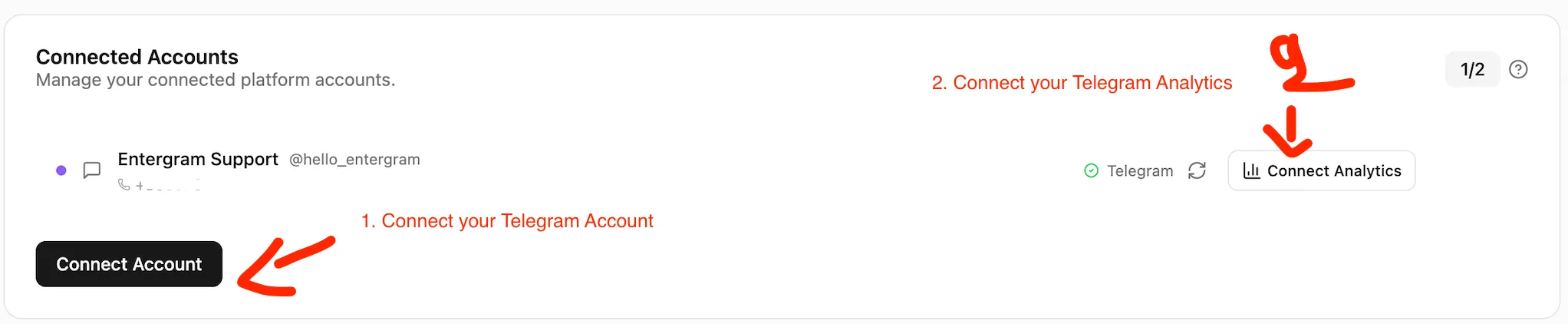
La connexion CRM active toutes les fonctionnalites principales du CRM Telegram : consultation des chats, envoi de messages, outil de diffusion Telegram, etiquettes et rappels. Votre session reste dans votre navigateur.
Cliquez sur “Connecter Telegram (CRM)” pour ouvrir l’ecran de verification.
Choisissez l’une de ces methodes :
Option A : Code QR (le plus rapide)
Option B : Numero de telephone
Votre compte Telegram est maintenant connecte au CRM Telegram. Vous pouvez utiliser toutes les fonctionnalites CRM immediatement, y compris la gestion de plusieurs comptes Telegram.
La connexion Analytics active les analyses de performance Telegram : temps de reponse, cartes thermiques d’activite, volumes de messages et comparaisons de productivite d’equipe Telegram.
Sur la page Parametres, cliquez sur “Connecter Analytics” dans la section Comptes.
Votre page d’analyses Telegram commencera a afficher des donnees en quelques minutes une fois la synchronisation terminee.
Vos sessions CRM sont protegees par un coffre-fort qui necessite une phrase secrete pour le deverrouiller. Si vous oubliez votre phrase secrete, vous pouvez utiliser votre phrase de recuperation de 12 mots pour retrouver l’acces.
Si vous perdez a la fois votre phrase secrete et votre phrase de recuperation :
Securite des donnees
Nous ne stockons pas votre mot de passe Telegram. Les deux connexions utilisent la verification securisee de Telegram (code QR ou codes a usage unique). Le contenu des messages n’est jamais lu par Entergram.
Apres la connexion, installez Entergram en tant que PWA pour une experience optimale :
Puis-je utiliser Entergram avec uniquement la connexion CRM ? Oui. La connexion CRM offre un acces complet a la gestion des prospects Telegram, la diffusion de messages Telegram, les etiquettes et les rappels. Les analyses Telegram sont optionnelles.
Puis-je revoquer la connexion Analytics plus tard ? Oui. Allez dans Telegram, puis Parametres, puis Appareils, puis Sessions actives et supprimez la session Entergram Analytics. Vos fonctionnalites CRM Telegram continuent de fonctionner.
Combien de comptes puis-je connecter ? Jusqu’a 5 comptes Telegram selon votre forfait. Gerez plusieurs comptes Telegram depuis une seule interface.
Lisez-vous mes messages ? Non. Nous traitons uniquement les metadonnees (horodatages, informations expediteur/destinataire, nombre de messages). Le contenu des messages n’est jamais consulte.
Entergram est-il un CRM Web3 ? Oui. Entergram est concu comme un CRM Web3 et un CRM Blockchain pour les equipes gerant les relations investisseurs, la communaute et les partenariats sur Telegram.