For agencies, iGaming and trading teams

The Telegram CRM
for sales and support teams

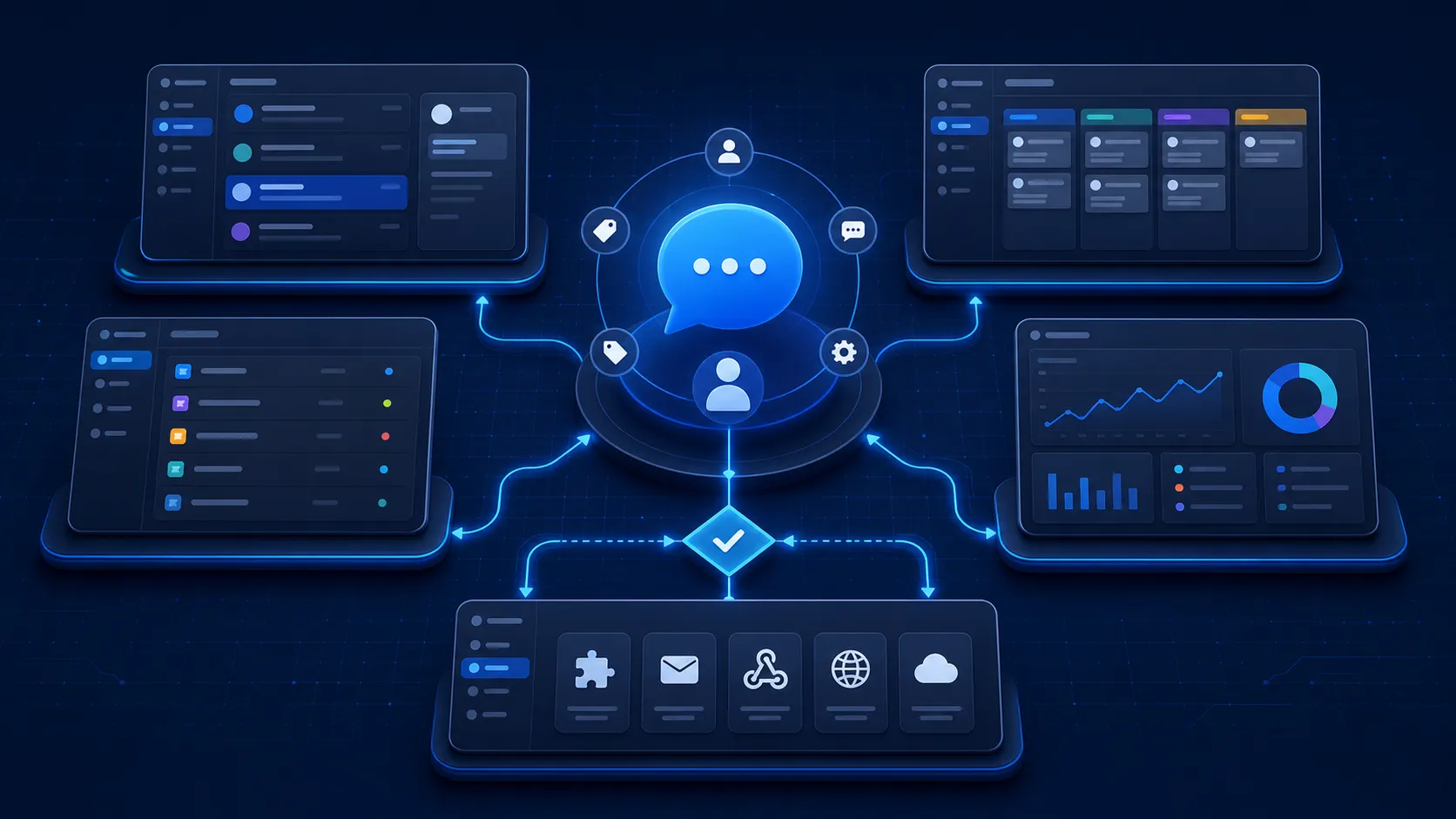
Manage multiple personal Telegram accounts from one inbox. Real accounts, not bots, each on its own proxy. Sales reps keep their own accounts, support shares one, and you decide who sees what.

Trusted by 300+ clients who run on Telegram

4.9 / 5 Customer rating, in-app survey

Works with your personal Telegram account.

One platform

One Telegram CRM for sales, support and analytics

Pipeline, tickets, reports and AI access, all running on the Telegram accounts your customers already message.

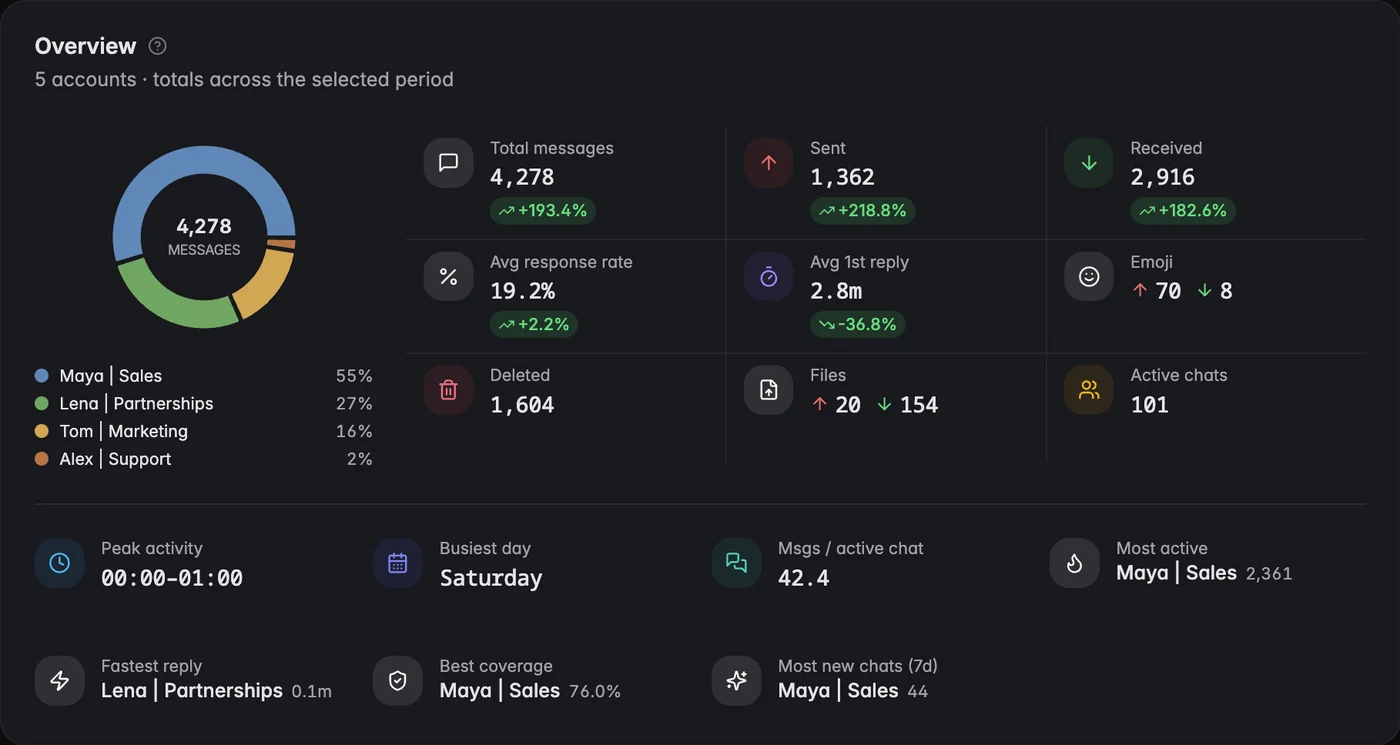
Telegram analytics dashboard with heatmaps and response time tracking Telegram analytics dashboard with heatmaps and response time tracking
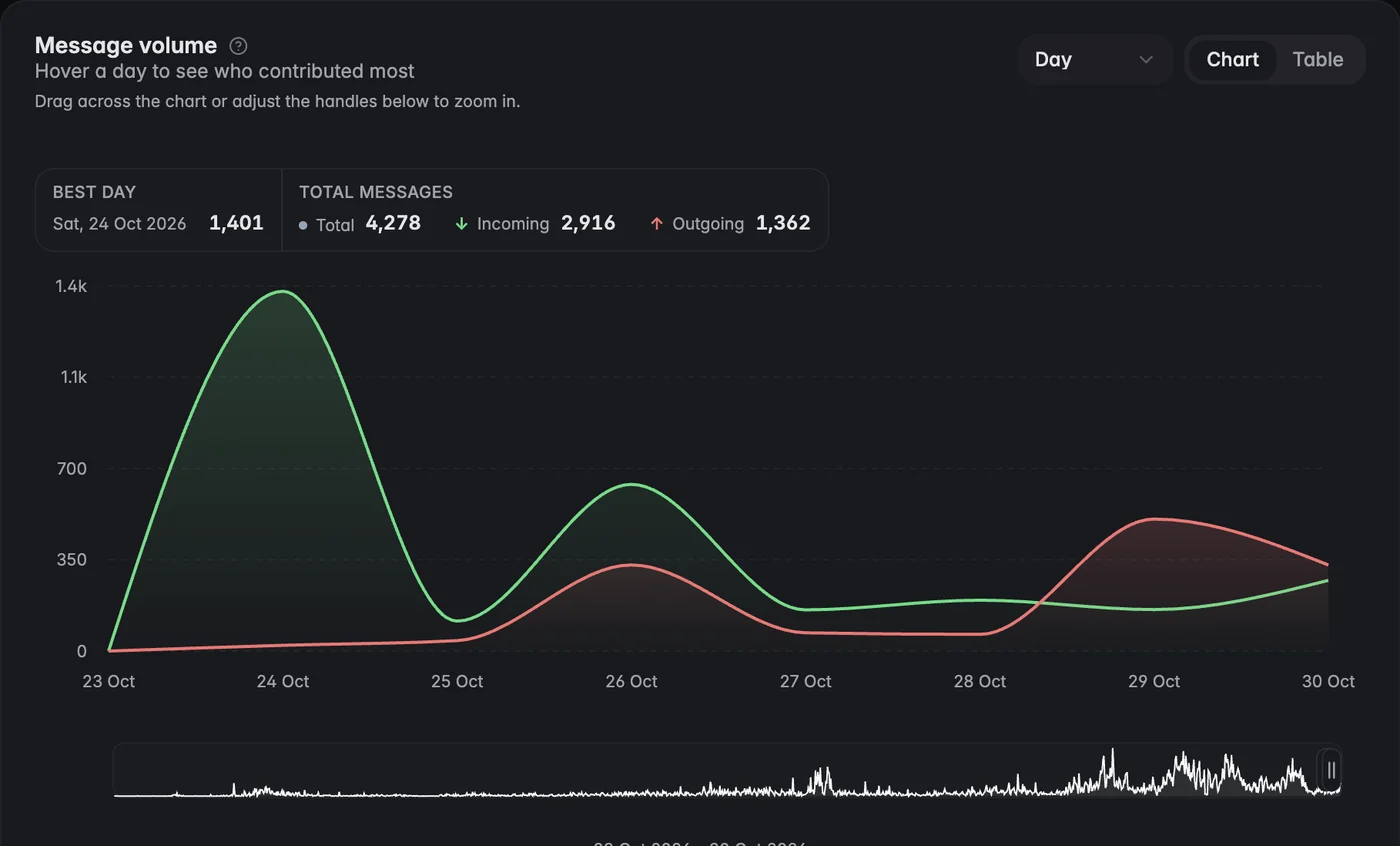
Message volume chart with incoming and outgoing messages Message volume chart with incoming and outgoing messages

Track response times, messages sent and received, and your busiest hours and days across every connected account.

Explore Analytics

Chats from all your Telegram accounts land in one CRM table. Turn on Hide usernames and the team works those chats without seeing client usernames.

Explore CRM

Turn any message into a ticket, assign it, and set status, priority and SLA. Customers keep writing to your normal Telegram account. No bots.

Explore Support

Connect HubSpot, Zendesk, Notion, Make.com and Slack. Zendesk turns chats into tickets, HubSpot and Notion sync your CRM fields.

Telegram CRM integrations

Connect multiple Telegram accounts to a single Telegram MCP

Connect Claude, ChatGPT, Grok, Gemini, Perplexity or another AI assistant to every Telegram account you run, with one login. Your AI can read chats, open tickets, fill in CRM fields and answer questions about your response times. No bots, no code.

Explore Telegram MCP
Works with your favorite AI
  • Claude
  • ChatGPT
  • Gemini
  • Perplexity
  • Grok
  • Cursor

Ask your AI to

Explore Telegram MCP
Your AI assistant Entergram MCP 4 accounts

Open a ticket for every support chat that has waited more than 2 hours for a reply.

5 tool calls

  • # #1042 Withdrawal stuck in pending@team_europe · waiting 3h 12m High
  • # #1043 Can't log in after a phone change@alex_support · waiting 2h 40m High
  • # #1044 Invoice shows the wrong company@team_apac · waiting 2h 05m Normal

3 tickets opened. The oldest has been waiting 3h 12m on @team_europe, so I set it to High.

Why Entergram

Tailored to Telegram. That's the whole advantage.

Most Telegram CRMs run on bots. Entergram runs on the personal accounts your customers already message, so you can start conversations, see the full chat history and keep each account on its own proxy.

Your team shares the CRM: columns, tags, tickets, templates and comments. Messages stay private. Each person only sees chats from the accounts they connected, unless you choose to share an account.

To share an account, a teammate connects the same Telegram account on their seat. You both work the same chats, live, from the same account.

See how it works

Broadcast, see which account owns which group, and add chats to your Telegram folders straight from the CRM. Everything mirrors Telegram directly, so your team can switch between Telegram and Entergram at any point.

Send one message to many existing chats, personalized for each person, from your real accounts. Sends are paced for Telegram and spread across accounts, each on its own proxy.

Or hand the send to your AI. With Entergram's Telegram MCP, Claude or ChatGPT can pick the chats, translate the message per recipient, and broadcast it from your own accounts.

See how it works
Telegram-first teams

Built for teams that sell and support on Telegram

Agencies, support desks and sales teams that work their clients through Telegram.

4.9/5 User rating
45% Faster response times
99% Uptime
3x More chats managed per rep

Entergram's own measurements: product usage data and our in-app customer survey. Not independently audited.

Finally one inbox for all my accounts. Stopped switching phones.
Mattias Community Manager
Broadcasts that don't get me banned. Worth the price alone.
Olya CMO
I can see who's slow to reply. Two reps got better that month.
Oleg Marketing Lead
View pricing details

Telegram CRM pricing

5 Telegram accounts per seat. +€5/mo per extra account in the same seat.

Basic

Core Telegram CRM

€29 /month

Included:

  • 5 Telegram accounts (+€5/mo per extra)
  • Dedicated-IP proxy for each account
  • Chat reminders
  • Data export
  • Team workspace
Start free trial

Enterprise

Self-hosted for organizations

Custom

Includes:

  • Everything in Basic + Pro
  • Self-hosting
  • SSO with Okta
Contact us
FAQ

Telegram CRM
frequently asked questions

Straight answers about running many Telegram accounts as one team.

What is a Telegram CRM?
A Telegram CRM is a CRM built on your Telegram conversations instead of next to them. Chats become leads, tickets and contacts with an owner, a stage and custom fields, and the team works them from one screen. Entergram connects your real personal Telegram accounts, not a bot, so the chats you already have show up on day one with their full history. Our guide explains what a Telegram CRM is and when you need one.
What is Entergram, and who is it for?
Entergram is a CRM that sits on top of Telegram for teams running many personal accounts. It is built for four kinds of team: BD and sales at crypto and Web3 projects, agencies managing client and community accounts, support teams whose customers will not leave Telegram, and iGaming and trading desks. They share one problem. There are more accounts than one person can watch, and no way to see what the team is doing inside them. Entergram puts every account, chat, owner and reply time in one place.
Is Entergram a Telegram CRM bot?
No. Most tools sold as a Telegram CRM bot run on the Bot API: customers talk to a @something_bot, the bot cannot start a conversation, and it never sees the chats you already have. Entergram connects your personal account over MTProto, the protocol Telegram Desktop uses. Replies go out under your own name, your existing chats, groups and channels are there from the first login, and you can write to people first. A bot is still the right choice for one-way broadcasts to anonymous subscribers. For selling and support with people who already know you, it cannot see the relationship.
Will connecting my Telegram account get it banned or frozen?
We have had zero bans on Entergram-managed accounts in the last six months (our own product data, not independently audited). Telegram restricts accounts for behaviour: messaging lots of strangers, sending faster than a person could, or logging in from an IP that looks nothing like the usual one. Entergram handles the last two. Every account runs on its own proxy, and broadcasts are paced and spread across accounts. The first is on you: no tool makes cold spam safe, and anyone promising that is selling something. If an account is ever flagged, here is what a frozen Telegram account means.
How much does a Telegram CRM cost?
Entergram starts at €29 per seat per month on Basic, with 5 Telegram accounts, each on its own proxy. Extra accounts in the same seat are €5/month each. Pro is €39 per seat and adds analytics, tickets, API and MCP access, and the Notion, Make.com and Slack integrations. Enterprise is self-hosted and priced per deployment. See full pricing.
Is there a free trial?
Yes. 3 days, every feature, no credit card. If you subscribe and it is not right for your team, there is a 3-day money-back guarantee.
Telegram accounts and proxies
  • How many Telegram accounts can I manage in one place?
    The official Telegram app logs in to 3 accounts, or 4 with Premium, and you switch between them one at a time. Entergram holds 100+ accounts in one inbox. Each seat includes 5 accounts and more cost €5/month each. See how teams manage multiple Telegram accounts without juggling phones.
  • Can I see all my Telegram accounts in one inbox?
    Yes. Chats from every connected account land in one inbox, and you filter by account, label or assignee instead of logging in and out. That is the real test of a multi-account tool: whether you filter by account or switch to it. A tool that makes you switch has only moved the problem into a browser tab.
  • Why does each Telegram account get its own proxy?
    Because 40 accounts logging in from one IP look like one operator running 40 accounts, which is exactly the pattern Telegram's anti-abuse systems look for. Entergram routes every connected account through its own unique proxy, so each keeps a stable, separate address.
  • Do I need to buy my own proxies?
    No. Every connected account gets its own unique proxy as part of the account price, set up when you connect it. There is nothing to buy, configure or rotate, and no shared datacentre address sitting behind 40 accounts.
  • Does Entergram work with groups and channels, or only private chats?
    Both. Private chats, groups and channels from every connected account are in the inbox, and a group ownership page shows which account owns which group or channel. Integrations treat them differently: HubSpot maps private chats, groups and channels to contacts, while Zendesk turns private chats into tickets and groups only if you choose.
  • Can I keep using the Telegram app on my phone?
    Yes. Entergram mirrors Telegram directly, so you can reply from your phone, open the same chat in Entergram a minute later, and nothing is lost either way. It also works back into Telegram: add chats to the account's Telegram folders from the CRM, and see which connected account owns which group.
  • How is Entergram different from Telegram Business?
    Telegram Business makes one account work like a storefront: opening hours, greeting and away messages, quick replies and a connected bot. It is built for one account. Entergram starts where several people and several accounts share the work: 100+ personal accounts in one inbox, with assignment, analytics, tickets, privacy controls and MCP. See Telegram Business vs Entergram.
Security and privacy
  • Is it safe to connect my Telegram account?
    Your Telegram session is stored encrypted with AES-256-GCM, and each account connects through its own proxy. Entergram uses MTProto, the same client protocol Telegram Desktop uses, and running several sessions on one account is a normal Telegram feature. For most teams the bigger risk is inside the team, which is why the privacy controls exist. Details are on our security page.
  • Does Entergram store my Telegram messages?
    No. Entergram fetches messages live from Telegram to show them to you and the teammates you allow, and keeps only short-lived caches, not your message history. Message text is also processed to deliver notifications. Your CRM data (stages, fields, tickets, comments) is stored; the conversations stay in Telegram.
  • Who can see my password and 2FA code?
    Nobody on your team. When several people work one account, each connects it from their own seat instead of passing a login around, and the 2FA stays with the account owner. Sharing credentials is risky and against Telegram's terms, so Entergram is built to avoid it.
  • Can I keep my personal chats private?
    Yes. Each person chooses which chats to share, and personal chats can be excluded entirely. Only the chats you choose to share appear for the team.
  • How do I stop an employee from deleting chats or taking client contacts?
    Entergram has four controls for exactly this: hide client usernames, hide group member information, block message editing and block message deletion. With usernames hidden, a rep works the chat without ever seeing who the client is, so there is nothing to copy on the way out. These controls exist because customers asked for them. Read how to prevent message deletion in Telegram.
  • Can I hide client usernames from my team?
    Yes. Turn on Hide usernames and the team works those chats without seeing client usernames. You can also hide group member information. A contractor can answer every message in a queue and still leave with nothing worth copying.
Sharing accounts and team visibility
  • Can my team share one Telegram account in a workspace?
    Yes, without sharing the login. Each teammate connects the same Telegram account on their own seat in the workspace. Telegram supports several sessions on one account natively, so everyone reads and replies in the same chats at once and nobody signs anyone out. This suits support teams answering from one public account. Each session runs on its own proxy, and the 2FA stays with the account owner.
    Connected Accounts
    Unified View Synced
    2m
    5m
    12m
    18m
    25m
    4 Connected Accounts · 87 chats
    Group Ownership
  • Can a salesperson keep their own Telegram account private?
    Yes. Sharing is a choice per account. The CRM is shared: columns, tags, tickets, templates and comments. Messages are not. Each person sees chats only from the accounts they connected, unless an account is shared on purpose. That fits BD teams where every rep runs their own Telegram account and the team still works one set of stages and fields.
  • How do I see what my team is doing on Telegram?
    Every chat from every connected account lands in one table with its account, assignee, stage and last message. You also get response times, messages sent and received, and busiest hours per account and per rep, so you see who is slow before a client tells you. A group ownership page shows which account owns which group or channel. For a record outside Telegram, the Slack integration relays each seat's chats into a channel as an audit log. More on response-time analytics.
  • Can I assign Telegram chats to teammates?
    Yes. Every chat has an Assignee field with a dropdown of your teammates, and every ticket has its own Assign To field. Filter the inbox by assignee to see each person's queue, or ask your AI assistant through MCP to assign every chat that matches a rule.
  • Can teammates leave internal comments on a chat?
    Yes. Comments sit on the chat inside Entergram and are never sent to the customer, so a handover reads like a note between colleagues instead of a guess. Templates, tags and custom columns are shared across the team the same way.
  • Can I see which of our accounts owns which group or channel?
    Yes. A dedicated page lists the groups and channels across all your connected accounts and which account owns each one. When someone leaves, or a community needs a new admin, you know exactly which account holds it.
For sales and BD teams
  • How do sales and BD teams use Entergram?
    Every inbound message on any connected account lands in the inbox as a lead. Reps set a stage, an owner, custom fields and a reminder, and the chat moves through the pipeline like any other deal. Replies come from the rep's own account, so follow-up reads like what it is: a person writing. Broadcasts reach many existing chats at once from real accounts. See the Telegram Sales CRM.
  • How does Entergram handle inbound Telegram leads?
    Every inbound message to any connected account lands in the inbox as a trackable lead. No form, no bot handoff, no import step. Set a stage, an owner and a reminder, and the chat moves through the pipeline like any other deal.
  • Can I build a sales pipeline with custom fields?
    Yes. Add custom columns for stage, deal size, source or anything else, with your own options, then filter and sort the inbox by them. Reminders bring a chat back when it is time to follow up. If HubSpot or Notion is your system of record, those fields sync both ways.
  • Can I message someone who has never written to us?
    Yes, from your real account. Find the person by username through live Telegram search, or by phone number through the connected account, and the first message goes out under your own name. Keep it to people who expect to hear from you: cold messaging large numbers of strangers is what gets accounts restricted, whatever tool you use.
  • Can I import a contact list?
    Yes. Imported columns become custom CRM fields, so you can filter by them and use them as merge tags in a broadcast. Entergram resolves each contact by username or phone number. It does not harvest members from groups your accounts have not joined, and it does not sell contact data.
  • Can I find new Telegram groups and leads?
    Yes, through Entergram's MCP. Your AI assistant runs a live Telegram search through a connected account and finds people, groups and channels outside your workspace, with member counts where Telegram shows them and whether any of your accounts already belongs. It matches names and usernames, not message content, and it is rate limited. For quick discovery, try our free Telegram group finder.
For support teams
  • How do support teams use Entergram?
    Customers keep writing to your normal Telegram account. Agents turn any message into a ticket with an assignee, status, priority and SLA, and work the queue on a Kanban board. Several agents can work one shared support account at once, and response times are tracked per agent. See Telegram support software.
  • Can I turn Telegram messages into support tickets?
    Yes. Any message becomes a ticket with an assignee, status, priority and SLA, linked to the chat it came from. Tickets live on a Kanban board, and the customer keeps writing to your normal Telegram account, not a bot or a portal. More on our Telegram ticketing system.
  • Can several agents answer from one support account?
    Yes. Each agent connects the same Telegram account on their own seat, and Telegram supports several sessions on one account, so the whole team works the queue at once without signing each other out. Assign each chat so two agents never answer the same customer.
  • Does Entergram work with Zendesk?
    Yes. Connect Zendesk with an admin account and private chats on the selected Telegram accounts become Zendesk tickets, with groups optional. A new message continues the open ticket, and agent replies written in Zendesk go out from the real Telegram account. Zendesk tickets also show read-only on Entergram's ticket board.
Who uses Entergram
  • How do agencies use Entergram to manage client accounts?
    As a Telegram account manager for the whole team. Connect every client and community account once, each on its own IP, then decide which teammate sees which account. Nobody passes phones or session files around, contractors can work chats with client usernames hidden, and the raw analytics export goes straight into a client report. More on Telegram CRM for marketing agencies.
  • Can I use Entergram as a Web3 or crypto CRM?
    Yes. Web3 BD teams run partner and KOL conversations across many personal accounts. Entergram puts them in one pipeline, shows which account sits in which community, and sends announcements translated per chat through MCP. See Telegram CRM for Web3 projects.
  • Is Entergram a fit for iGaming and casino teams?
    Yes. iGaming, casino and affiliate teams run player and partner chats from many accounts, each on its own proxy, with privacy controls so agents never see the client list. Read our iGaming CRM guide.
  • Does Entergram work for trading desks and OTC teams?
    Yes. Trading and OTC desks run client conversations from several personal accounts, and every reply has to come from the account the client already trusts. Entergram keeps those chats in one inbox with an owner and a stage, and the privacy controls stop anyone copying the client list. See Telegram CRM for P2P and OTC trading.
  • Can community managers and KOL teams use it?
    Yes. Community teams use the group ownership page to see which account holds which group or channel, broadcast announcements to existing chats, and track how fast moderators reply. See Telegram CRM for community management.
Broadcasts and analytics
  • Can I send bulk messages on Telegram without getting banned?
    Yes, to people you already have a chat with or a list you supply. A broadcast sends one message to many chats, personalized per recipient with merge tags, from your real accounts. Sends are paced for Telegram and can be spread across several accounts, each on its own proxy. Entergram does not scrape members from groups you have not joined. Our guide: how to send bulk messages on Telegram.
  • Can one broadcast go out from several accounts?
    Yes. Spread a send across several connected accounts, each on its own proxy, with pacing tuned for Telegram. Replies land back in each contact's own chat against the CRM record, so a campaign turns into tracked conversations instead of a one-way blast.
  • What Telegram analytics do I get?
    Messages sent and received, response times, and busiest hours and days, across every connected account. The raw data is downloadable, so it goes into a spreadsheet or a client report instead of staying in a dashboard. It measures your team's conversations, not channel views or subscriber growth. See Telegram analytics.
  • Can I compare response times across my team?
    Yes. Managers compare reps and accounts side by side: response times, messages sent and received, and busiest hours and days. It is the fastest way to find the account that goes quiet overnight, or the rep who needs help, before a customer notices.
  • Can I export my data?
    Yes. Export CRM data to CSV, including custom columns and metadata, and download the raw analytics data for spreadsheets or client reports. Messages are not in the export, because Entergram does not keep message history in its database.
AI and Telegram MCP
  • What is Telegram MCP?
    MCP lets an AI assistant work inside your Telegram accounts. Entergram's hosted MCP covers every account on your seat with one OAuth login, so Claude, ChatGPT or another MCP client can read chats, open and triage tickets, fill CRM fields, translate a broadcast per recipient and answer questions about your response times. You never create an api_id or store a session string per account. Live search matches names and usernames, not message content, and it cannot open private groups the account was never admitted to. More on our Telegram MCP server.
  • Can I connect Claude to my Telegram accounts?
    Yes. Copy the MCP URL from Entergram (Settings, then Workspace, then Connectors, then MCP), add it in Claude, and log in once. Claude then works across every Telegram account on your seat: it reads chats, opens tickets, fills CRM fields and drafts replies in the customer's language. No api_id, no session strings, no code.
  • Can I connect ChatGPT to Telegram?
    Yes, through the same MCP connection: copy the URL from Entergram, add it in ChatGPT and sign in once. ChatGPT then works across every account on your seat, not one bot. Our step-by-step guide shows how to connect ChatGPT to Telegram.
  • Can AI answer questions about my team's performance?
    Yes. The MCP exposes the raw message events from every account on your seat, so your assistant works out the answer itself: first-reply times per account last week, which chats nobody answered today, the busiest hour for your Asia accounts. You are not limited to the built-in reports.
  • Is Entergram an AI CRM?
    It works as one. Connect Claude, ChatGPT or any MCP client and the AI reads chats, drafts replies and updates CRM fields across your real conversations, not a siloed copy. Because the AI acts from your own accounts, it has context a generic AI CRM never sees.
Integrations and API
  • Does Entergram integrate with HubSpot, Zendesk or my CRM?
    Five integrations are live: HubSpot, Zendesk, Notion, Make.com and Slack. HubSpot maps each chat to a contact and syncs custom fields both ways. Zendesk turns private chats into tickets and sends agent replies from the real Telegram account. Notion syncs each chat to a database row. Make.com updates tags and contact details. Slack keeps an audit log of each seat's chats. See all Telegram CRM integrations.
  • Is a CRM for Telegram the same as a CRM with Telegram integration?
    No, and the difference decides what your team sees. A CRM with Telegram integration keeps the record in a general CRM and pipes some messages in, usually through a bot, so it only sees chats a customer opened with that bot. A CRM for Telegram, sometimes called a TG CRM, is built on the conversations themselves: your real accounts, their groups and channels, and the history from before you signed up. Entergram is the second kind, and if you run HubSpot it still syncs each chat to a HubSpot contact.
  • Does Entergram work with Notion and Make.com?
    Yes. Notion maps each chat to a row in one database per workspace, with custom fields, column names and select options syncing both ways in near real time. The Make.com app updates tags and contact details and marks chats as read, so you can wire Telegram into the rest of your stack without code. Both are on the Pro plan.
  • Is there an API?
    Yes. The Pro plan includes API access alongside MCP. The API documentation lists what you can build on.
  • Can I request an integration we need?
    Yes. Message the team on Telegram at @hello_entergram or email hello@entergram.com. We build the integrations users ask for, and we list only the five that are live today: HubSpot, Zendesk, Notion, Make.com and Slack.
Pricing, plans and setup
  • Is pricing per seat or per Telegram account?
    Per seat, with accounts included. Each seat comes with 5 Telegram accounts, each on its own proxy, and you add more accounts to the same seat at €5/month each. One BD lead with 8 accounts needs one seat, not eight. Five agents sharing one support account need five seats and one account.
  • Why does Entergram cost more than a Telegram bot tool?
    A bot costs almost nothing to run: Telegram hosts the connection and there is no session to protect. A real account needs its own persistent MTProto session, stored encrypted and kept alive around the clock, routed through its own proxy so it is not flagged. On Basic that works out at €5.80 per account per month, proxy included.
  • Can I pay yearly?
    Yes. Yearly billing on Basic and Pro saves you 2 months compared with paying monthly. Enterprise is priced per deployment.
  • Can I self-host Entergram?
    Yes, on the Enterprise plan. You run the deployment on infrastructure you control and choose the data region. CRM records live in PostgreSQL inside your deployment, raw message history stays in Telegram, and SSO with Okta is included. We supply release packages and a supported upgrade path; your team runs backups and monitoring. See self-hosted Telegram CRM.
  • Is Entergram an online CRM, or do I install something?
    It is an online Telegram CRM. It runs in your browser, there is nothing to install, and your accounts stay connected on our side when your laptop is closed.
  • How do I connect my first Telegram account?
    The same way you log in to Telegram Desktop: phone number, login code, and your 2FA password if the account has one. Your chats, groups and contacts are already there, because they already exist in Telegram. Then invite teammates and choose which accounts each one sees.
  • How do I reach a real person at Entergram?
    Message @hello_entergram on Telegram or email hello@entergram.com. A person on the team answers, not a bot, and that includes questions before you buy.
Compared with other tools
  • Which Telegram CRM is best for my team?
    Start with the account model. If customers come to you and a bot identity is fine, a bot-based tool is cheaper. If your deals and support run on personal accounts, you need a tool that connects those accounts, keeps each on its own proxy and lets several people work them. Our best Telegram CRM comparison scores 10 tools on exactly that.
  • How is Entergram different from CRMChat?
    Both connect real personal Telegram accounts, not bots. CRMChat centres on outreach: lead discovery, sequences and account warm-up. Entergram centres on what happens after the reply: 100+ accounts in one inbox, each on its own proxy, tickets, analytics and controls that keep client data in the company when an employee leaves. See CRMChat vs Entergram.
  • Do I still need HubSpot if I use Entergram?
    Keep it if HubSpot runs your forms, email sequences and reporting. HubSpot has no Telegram channel of its own, so Entergram runs the Telegram side and its HubSpot integration maps every chat to a HubSpot contact with custom fields syncing both ways. Messages stay in Entergram. See HubSpot vs Entergram.
For agencies, iGaming and trading teams

Every Telegram account your team runs, in one place

Free 3-day trial. No credit card required.

  • Telegram sales CRM and support desk
  • Response-time analytics
  • MCP for Claude and ChatGPT