Безопасность данных
Мы не храним ваш пароль Telegram. Оба подключения используют безопасную верификацию Telegram (QR-код или одноразовые коды). Содержимое сообщений никогда не читается Entergram.
Подключение аккаунта Telegram к Entergram активирует функции Telegram CRM и аналитику Telegram. В этом руководстве описаны оба типа подключения для настройки вашей Web3 CRM.
Entergram использует два отдельных подключения для различных целей в вашем инструменте управления Telegram:
| Подключение | Назначение | Хранение сессии | Обязательно? |
|---|---|---|---|
| CRM-подключение | Управление чатами, массовая рассылка в Telegram, метки, напоминания | Ваш браузер (локальное хранилище) | Да |
| Подключение аналитики | Аналитика производительности Telegram, тепловые карты, отслеживание времени ответа | Серверы Entergram (зашифровано) | По желанию |
Зачем два подключения?
Примечание о конфиденциальности: Мы никогда не читаем содержимое ваших сообщений ни в одном из подключений. Аналитика Telegram обрабатывает только метаданные (временные метки, информация об отправителе/получателе, количество сообщений).
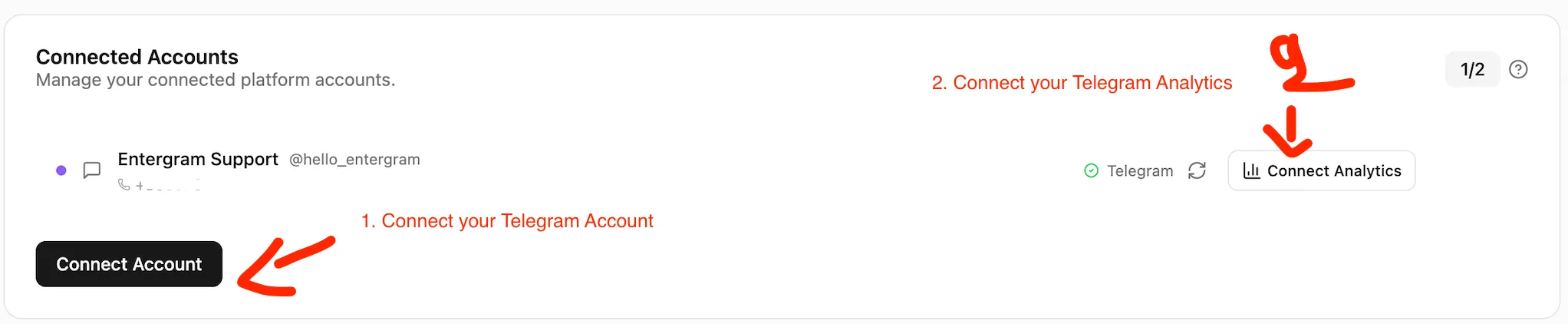
CRM-подключение активирует все основные функции Telegram CRM: просмотр чатов, отправку сообщений, инструмент рассылки Telegram, метки и напоминания. Ваша сессия остаётся в вашем браузере.
Нажмите “Подключить Telegram (CRM)”, чтобы открыть экран верификации.
Выберите один из способов:
Вариант А: QR-код (самый быстрый)
Вариант Б: Номер телефона
Ваш аккаунт Telegram теперь подключён к Telegram CRM. Вы можете сразу использовать все функции CRM, включая управление несколькими аккаунтами Telegram.
Подключение аналитики активирует аналитику производительности Telegram: время ответа, тепловые карты активности, объёмы сообщений и сравнение продуктивности команды в Telegram.
На странице Настройки нажмите “Подключить аналитику” в разделе «Аккаунты».
Страница аналитики Telegram начнёт отображать данные в течение нескольких минут после завершения синхронизации.
Ваши CRM-сессии защищены хранилищем, для разблокировки которого требуется пароль. Если вы забудете пароль, вы можете использовать фразу восстановления из 12 слов для восстановления доступа.
Если вы потеряете и пароль, и фразу восстановления:
Безопасность данных
Мы не храним ваш пароль Telegram. Оба подключения используют безопасную верификацию Telegram (QR-код или одноразовые коды). Содержимое сообщений никогда не читается Entergram.
После подключения установите Entergram как PWA для лучшего опыта использования:
Можно ли использовать Entergram только с CRM-подключением? Да. CRM-подключение обеспечивает полный доступ к управлению лидами в Telegram, массовой рассылке в Telegram, меткам и напоминаниям. Аналитика Telegram является дополнительной функцией.
Можно ли отозвать подключение аналитики позже? Да. Перейдите в Telegram -> Настройки -> Устройства -> Активные сессии и удалите сессию Entergram Analytics. Функции Telegram CRM продолжат работать.
Сколько аккаунтов можно подключить? До 5 аккаунтов Telegram в зависимости от вашего тарифного плана. Управляйте несколькими аккаунтами Telegram из одного интерфейса.
Вы читаете мои сообщения? Нет. Мы обрабатываем только метаданные (временные метки, информация об отправителе/получателе, количество сообщений). Содержимое сообщений никогда не читается.
Является ли Entergram Web3 CRM? Да. Entergram разработан как Web3 CRM и Blockchain CRM для команд, управляющих отношениями с инвесторами, сообществом и партнёрствами в Telegram.