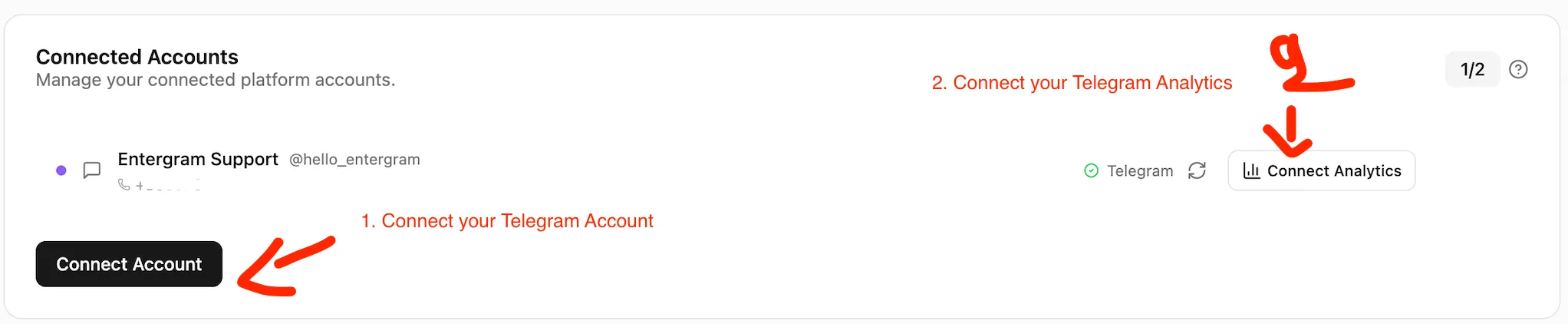
A quick guide to linking your Telegram account for unparalleled CRM control and deep performance insights.
Entergram uses a unique, two-part connection system to give you the best combination of maximum privacy and powerful, real-time analytics. Connecting your account is fast, secure, and opens up the full power of the platform—from live chat and broadcasting to team heatmaps and SLA tracking.
We require two separate connections to bypass limitations in Telegram’s API, allowing us to deliver complex, real-time analytics without ever reading your messages.
This deliberate architecture ensures:
Maximum Privacy: Your day-to-day chat session is 100% private and stays in your browser.
Unbeatable Analytics: We can run heavy-duty calculations for team performance and deep insights on our secure servers.
Connection Type
Purpose
Session Location
Key Benefit
1st Connection (CRM)
Core CRM Features: Live Chat, Broadcasting, Ticketing, Labels.
Your Browser Only (Local Storage)
Guaranteed Privacy. Messages are never read by Entergram.
2nd Connection (Analytics)
Deep Insights: Heatmaps, Response Time, Message Volume, Team Leaderboards.
Secure Entergram Servers (Encrypted at Rest)
Powerful Performance Data. Messages are never read by Entergram.
You can use the 1st connection forever for full CRM functionality if ultimate privacy is your goal.
Activate the 2nd connection only when you are ready for advanced team analytics. It takes 10 seconds and can be revoked instantly from your Telegram sessions settings.
Maximum privacy or maximum insights—the choice is always yours. Most power users enable both to get the best performance boost.
Your Telegram account is now securely connected to the CRM. You can immediately use live chat, broadcasting, and ticketing. Your session remains 100% in your browser.
Your Analytics Page will begin populating with real-time metrics, heatmaps, and performance charts within minutes.
Data Security Guarantee
We do not store your Telegram password. Both connections use Telegram’s secure verification methods (QR/one-time codes). The 1st connection stays in your browser; the 2nd is encrypted on our servers for heavy analytics work. We never read your messages in either case.
Q: Why do I need two separate connections?
A: The first connection ensures maximum privacy by keeping your data client-side. The second connection allows us to perform intensive, server-side calculations (like team heatmaps and response time tracking) that Telegram’s API limits prevent us from doing in your browser alone. It’s for power, not intrusion.
Q: Do you ever read my messages?
A: No. Messages are never read by Entergram. We only process non-private metadata for analytics (timestamps, message counts, sender/receiver IDs, etc.).
Q: Can I revoke the 2nd connection later?
A: Absolutely. You can revoke it instantly from your Telegram sessions settings without affecting your core CRM features.