Data Security
We do not store your Telegram password. Both connections use Telegram’s secure verification (QR code or one-time codes). Message content is never read by Entergram.
Connecting your Telegram account to Entergram enables Telegram CRM features and Telegram analytics. This guide explains both connection types for your Web3 CRM setup.
Entergram uses two separate connections for different purposes in your Telegram management tool:
| Connection | Purpose | Session Storage | Required? |
|---|---|---|---|
| CRM Connection | Chat management, Telegram bulk messaging, labels, reminders | Your browser (local storage) | Yes |
| Analytics Connection | Telegram performance analytics, heatmaps, response tracking | Entergram servers (encrypted) | Optional |
Why two connections?
Privacy note: We never read your message content in either connection. Telegram analytics processes metadata only (timestamps, sender/receiver info, message counts).
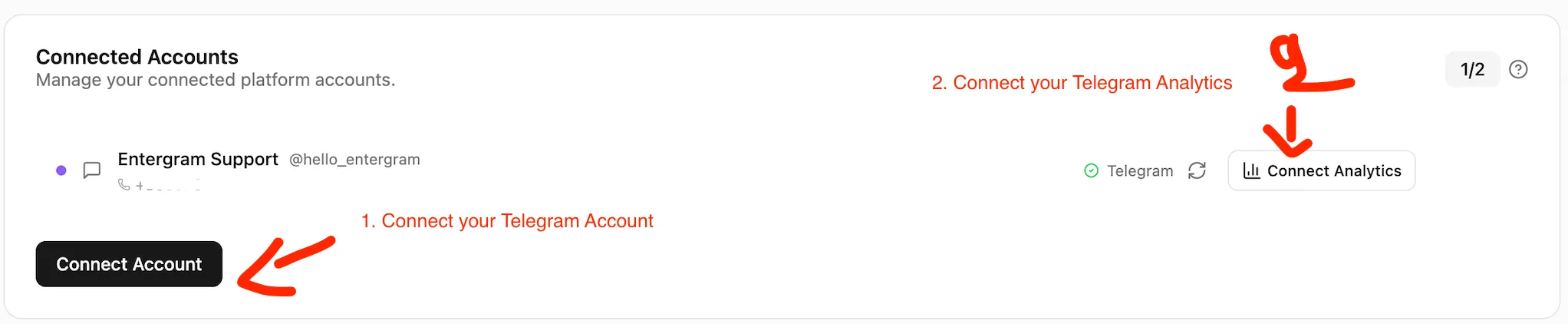
The CRM connection enables all core Telegram CRM features: viewing chats, sending messages, Telegram broadcast tool, labels, and reminders. Your session stays in your browser.
Click “Connect Telegram (CRM)” to open the verification screen.
Choose one of these methods:
Option A: QR Code (fastest)
Option B: Phone Number
Your Telegram account is now connected to the Telegram CRM. You can use all CRM features immediately, including manage multiple Telegram accounts.
The Analytics connection enables Telegram performance analytics: response times, activity heatmaps, message volumes, and Telegram team productivity comparisons.
On the Settings page, click “Connect Analytics” in the Accounts section.
Your Telegram analytics page will start showing data within a few minutes as synchronization completes.
Your CRM sessions are protected by a vault that requires a passphrase to unlock. If you forget your passphrase, you can use your 12-word recovery phrase to regain access.
If you lose both your passphrase and recovery phrase:
Data Security
We do not store your Telegram password. Both connections use Telegram’s secure verification (QR code or one-time codes). Message content is never read by Entergram.
After connecting, install Entergram as a PWA for the best experience:
Can I use Entergram with just the CRM connection? Yes. The CRM connection provides full access to Telegram lead management, Telegram bulk messaging, labels, and reminders. Telegram analytics is optional.
Can I revoke the Analytics connection later? Yes. Go to Telegram → Settings → Devices → Active Sessions and remove the Entergram Analytics session. Your Telegram CRM features continue working.
How many accounts can I connect? Up to 5 Telegram accounts depending on your plan. Manage multiple Telegram accounts from one interface.
Do you read my messages? No. We process metadata only (timestamps, sender/receiver info, message counts). Message content is never accessed.
Is Entergram a Web3 CRM? Yes. Entergram is designed as a Web3 CRM and Blockchain CRM for teams managing investor relations, community, and partnerships on Telegram.