Datensicherheit
Wir speichern Ihr Telegram-Passwort nicht. Beide Verbindungen nutzen Telegrams sichere Verifizierung (QR-Code oder Einmal-Codes). Nachrichteninhalte werden niemals von Entergram gelesen.
Die Verbindung Ihres Telegram-Kontos mit Entergram aktiviert Telegram CRM-Funktionen und Telegram-Analysen. Diese Anleitung erklaert beide Verbindungstypen fuer Ihre Web3 CRM-Einrichtung.
Entergram verwendet zwei separate Verbindungen fuer unterschiedliche Zwecke in Ihrem Telegram-Management-Tool:
| Verbindung | Zweck | Sitzungsspeicherung | Erforderlich? |
|---|---|---|---|
| CRM-Verbindung | Chat-Verwaltung, Telegram-Massenversand, Labels, Erinnerungen | Ihr Browser (lokaler Speicher) | Ja |
| Analyse-Verbindung | Telegram-Leistungsanalysen, Heatmaps, Antwortzeitverfolgung | Entergram-Server (verschluesselt) | Optional |
Warum zwei Verbindungen?
Datenschutzhinweis: Wir lesen niemals Ihre Nachrichteninhalte bei keiner der beiden Verbindungen. Telegram-Analysen verarbeiten nur Metadaten (Zeitstempel, Absender-/Empfaengerinformationen, Nachrichtenanzahl).
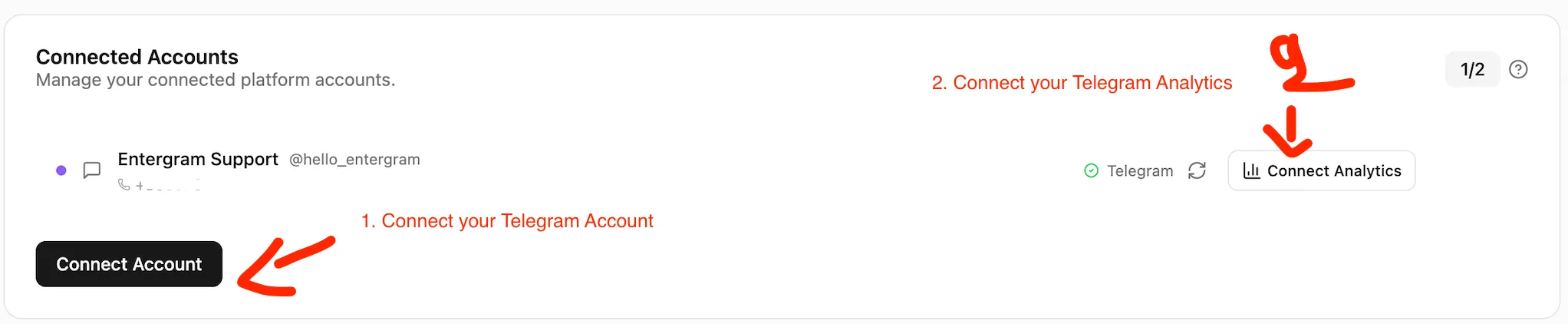
Die CRM-Verbindung aktiviert alle grundlegenden Telegram CRM-Funktionen: Chats anzeigen, Nachrichten senden, Telegram-Broadcast-Tool, Labels und Erinnerungen. Ihre Sitzung bleibt in Ihrem Browser.
Klicken Sie auf “Telegram verbinden (CRM)”, um den Verifizierungsbildschirm zu oeffnen.
Waehlen Sie eine dieser Methoden:
Option A: QR-Code (am schnellsten)
Option B: Telefonnummer
Ihr Telegram-Konto ist jetzt mit dem Telegram CRM verbunden. Sie koennen alle CRM-Funktionen sofort nutzen, einschliesslich der Verwaltung mehrerer Telegram-Konten.
Die Analyse-Verbindung aktiviert Telegram-Leistungsanalysen: Antwortzeiten, Aktivitaets-Heatmaps, Nachrichtenvolumen und Telegram-Teamproduktivitaets-Vergleiche.
Klicken Sie auf der Einstellungen-Seite auf “Analysen verbinden” im Bereich Konten.
Ihre Telegram-Analysen-Seite beginnt innerhalb weniger Minuten Daten anzuzeigen, sobald die Synchronisierung abgeschlossen ist.
Ihre CRM-Sitzungen werden durch einen Tresor geschuetzt, der eine Passphrase zum Entsperren erfordert. Wenn Sie Ihre Passphrase vergessen, koennen Sie Ihre 12-Woerter-Wiederherstellungsphrase verwenden, um den Zugang wiederherzustellen.
Wenn Sie sowohl Ihre Passphrase als auch Ihre Wiederherstellungsphrase verlieren:
Datensicherheit
Wir speichern Ihr Telegram-Passwort nicht. Beide Verbindungen nutzen Telegrams sichere Verifizierung (QR-Code oder Einmal-Codes). Nachrichteninhalte werden niemals von Entergram gelesen.
Installieren Sie nach der Verbindung Entergram als PWA fuer das beste Erlebnis:
Kann ich Entergram nur mit der CRM-Verbindung nutzen? Ja. Die CRM-Verbindung bietet vollen Zugriff auf Telegram-Lead-Management, Telegram-Massenversand, Labels und Erinnerungen. Telegram-Analysen sind optional.
Kann ich die Analyse-Verbindung spaeter widerrufen? Ja. Gehen Sie zu Telegram -> Einstellungen -> Geraete -> Aktive Sitzungen und entfernen Sie die Entergram Analytics-Sitzung. Ihre Telegram CRM-Funktionen funktionieren weiterhin.
Wie viele Konten kann ich verbinden? Bis zu 5 Telegram-Konten je nach Ihrem Tarif. Verwalten Sie mehrere Telegram-Konten ueber eine Oberflaeche.
Lesen Sie meine Nachrichten? Nein. Wir verarbeiten nur Metadaten (Zeitstempel, Absender-/Empfaengerinformationen, Nachrichtenanzahl). Auf Nachrichteninhalte wird niemals zugegriffen.
Ist Entergram ein Web3 CRM? Ja. Entergram wurde als Web3 CRM und Blockchain CRM fuer Teams entwickelt, die Investorenbeziehungen, Community und Partnerschaften auf Telegram verwalten.