Security
The Analytics connection uses AES-256-GCM encryption. Sessions are encrypted at rest on our servers. You can revoke access anytime from Telegram’s active sessions settings.
此内容尚不支持你的语言。
The Analytics connection enables Telegram performance analytics features: response times, activity heatmaps, message volumes, and Telegram team management comparisons.
With Telegram analytics connected, you can access:
The Telegram analytics connection runs on Entergram’s servers (encrypted) rather than in your browser. This is necessary because:
Privacy note: We process metadata only (timestamps, sender/receiver info, message counts). Message content is never read.
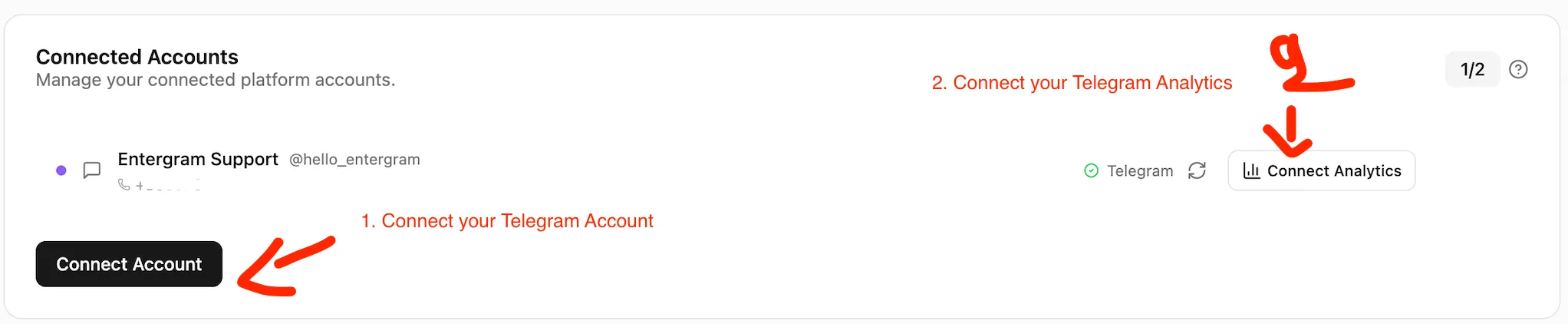
You must have the CRM connection set up first in your Telegram CRM. See the Connect Telegram guide if you haven’t done this.
Click “Connect Analytics” to begin setting up Telegram performance analytics.
Data synchronization begins immediately. Your Telegram analytics page will populate within a few minutes.
Security
The Analytics connection uses AES-256-GCM encryption. Sessions are encrypted at rest on our servers. You can revoke access anytime from Telegram’s active sessions settings.
To disconnect Telegram analytics:
Your Telegram CRM features continue working normally after revoking Analytics.
Is Telegram Analytics required? No. Telegram CRM features work independently. Telegram analytics is optional but recommended for teams tracking Telegram team productivity.
What data do you collect? Metadata only: timestamps, sender/receiver info, message counts, read receipts. We never read message content.
How long does sync take? Initial sync typically completes within a few minutes. Real-time Telegram performance analytics data appears immediately after.
Can I use Analytics without the CRM connection? No. The Telegram CRM connection is required first.
Is this useful for Web3 teams? Yes. Telegram analytics is essential for Web3 CRM and Blockchain CRM teams tracking investor relations, community engagement, and partnership outreach performance.