Zum Inhalt springen

How to Connect Telegram Analytics

Dieser Inhalt ist noch nicht in deiner Sprache verfügbar.

Connecting your Telegram account to Entergram is a quick, secure process that enables comprehensive data tracking on your communication patterns, response performance, and chat activity.

🔗 Connecting Your Telegram Account to our CRM

Section titled “🔗 Connecting Your Telegram Account to our CRM”

To begin receiving detailed insights into your Telegram usage, follow these simple steps:

  • Open the Entergram application.
  • Navigate to the Settings Page.
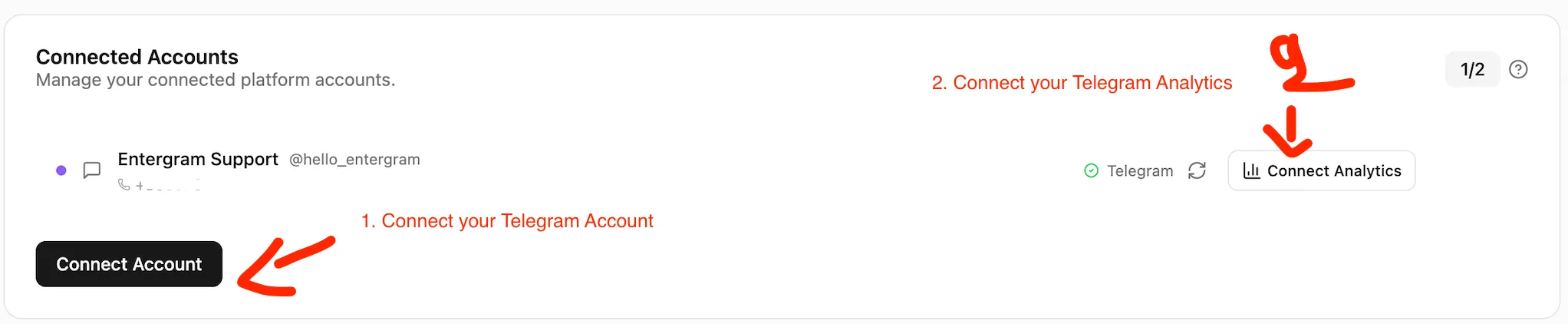
  1. Within the Accounts section of the Settings Page, click the “Connect” Analytics”** button.
    • This action will open a verification screen presenting you with two options for connection: QR Code Scan or Text Message Verification.
  2. Entergram offers 2 connection methods - for CRM and for Analytics,
    • Users will have to connect in our CRM for using our CRM services, and to connect to Analytics for viewing their Analytics.
How to connect Telegram to a CRM

Step 3: Verify with Telegram (Choose Your Method)

Section titled “Step 3: Verify with Telegram (Choose Your Method)”

To ensure security, you must authorize the connection using one of the following methods:

  • Use the Telegram mobile application on your phone to scan the QR code displayed on the Entergram verification screen.
  • Confirm the login/connection within your Telegram mobile app.
  • Select the “Use phone number instead” option.
  • Enter your phone number
  • Check your Telegram application for a new message containing a 5-digit verification code.
  • Return to the Entergram platform and enter the 5-digit code into the provided field on the Connect Analytics screen.

Once the connection is successfully authorized:

  • Your Telegram account will be securely connected to Entergram’s system.

To connect your Analytics, you need to follow step 2.

  • Data synchronization will begin, and your Analytics Page will start populating with real-time metrics and charts.

Data Security Note

This process uses either a secure QR code scan or a one-time verification code sent directly through Telegram to ensure that only you can authorize the connection of your data to the Entergram platform. We do not store your Telegram password.